For everyone who uses AI agents
Your agents. Your terms.
AI agents now spend, send and sign for you. Agent Minder™ lets you see what your connected agents do, approve what matters, and ask any of them to stop in one tap.
Free to join · Starting with Claude and ChatGPT · Agent Minder is being built in the UK. It is not available yet.
See it
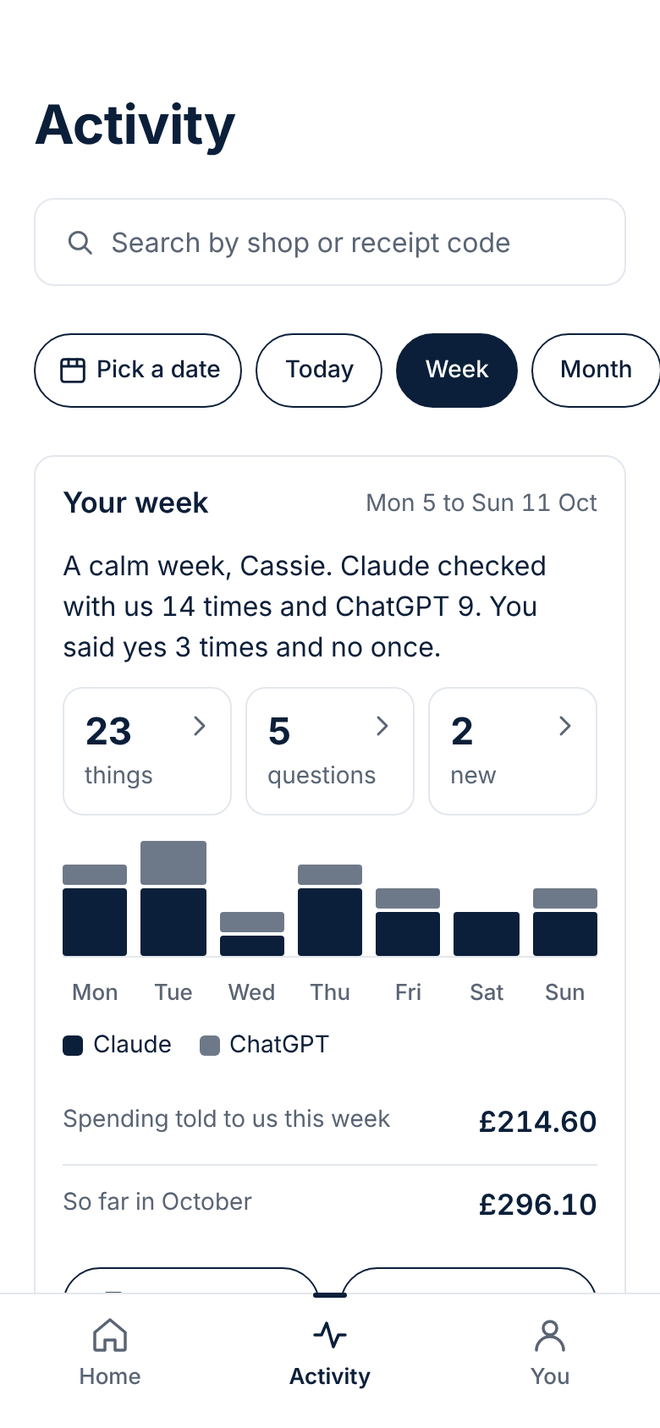
What your agents did. Today, this week, this month.
Each connected agent is asked to report to Agent Minder as it works, so you get one plain-English record of what they do.
Today, as it happens
Your week and your month
Spending against your own limit
Each agent's track record
Approve it
Spending, emails, bookings, sign-ups. Your agents are asked to check with you first.
You decide what needs your yes. When your agent asks, you tap Approve or Not now, even from your lock screen.
What it checks with you about
Careful, Balanced or Relaxed
Rules in your own words
If you don't answer
Guard it
Know who your agent is dealing with.
Your agent deals with shops, people and other agents all day, and some of them aren't what they seem.
Unknown agents, checked first
New shops and new contacts
Something it has never done before
When a trick turns into an action
Stop it
Ask one agent, or all of them, to stop in one tap.
Each agent has its own switch, and one switch covers them all. Nothing is lost while they're paused.
Pause one, or pause all
Holiday mode
Freeze spending
Know when one goes quiet
Prove it
A signed receipt for everything.
When a shop, a bank or the agent's maker disagrees about what happened, your signed receipt shows what you approved, and when.
Help settle a dispute
Find any receipt
A signed weekly statement
When a rule is broken
Every screen
Take a tour of the app.
All 28 screens, one at a time. Designs, not the finished app.
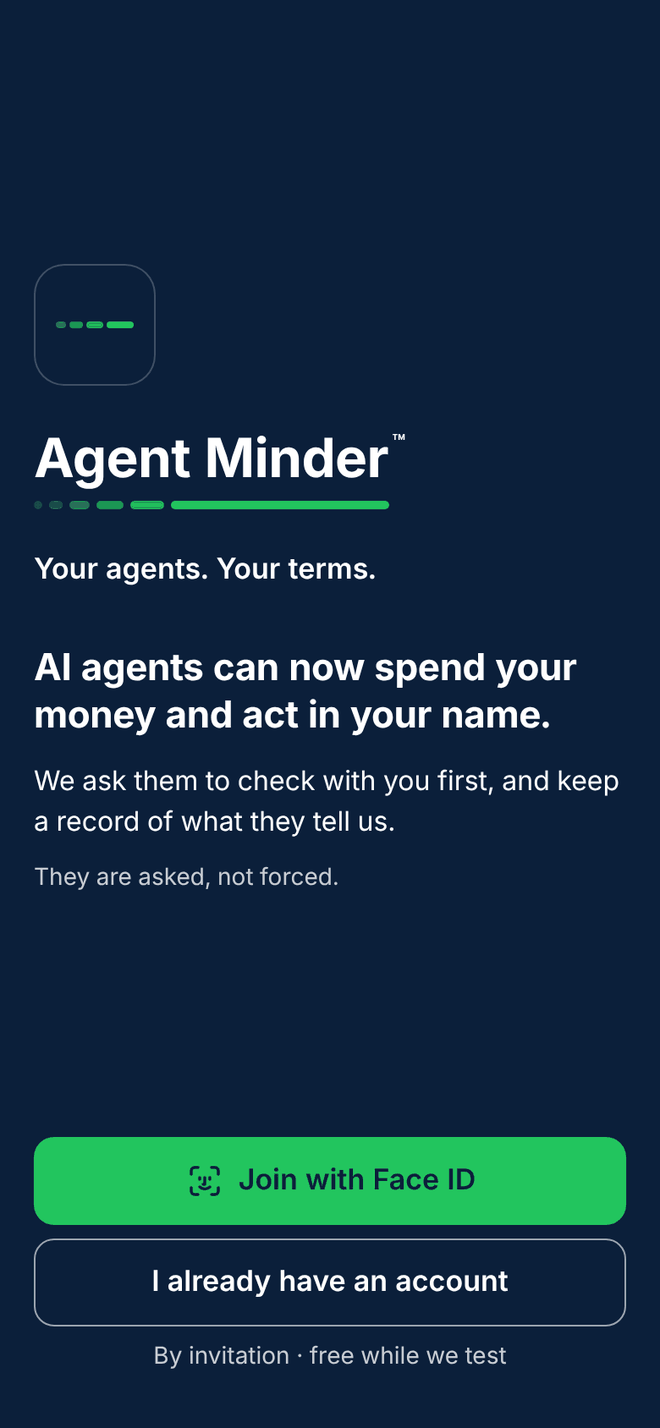
1 of 28 · Getting started
Welcome: what Agent Minder is, in one screen
The first screen you see. It says what Agent Minder does before it asks you for anything.
Your agents. Your terms.
The promise in four words, so you know at once why you're here.
Honest from the start
Your agents are asked to check with you first. The screen says plainly that they are asked, not forced.
By invitation while we test
The first version opens to invited testers, and it is free while we test.
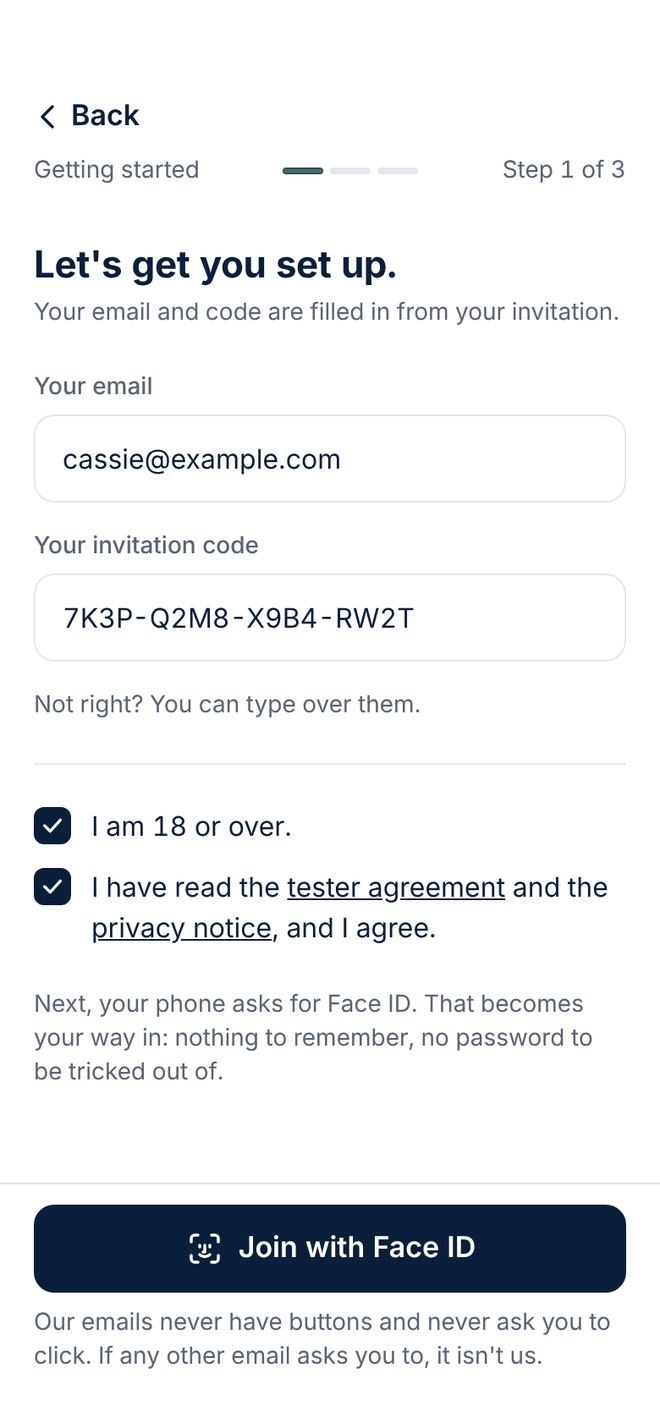
2 of 28 · Getting started
Your invitation: the email and the code we sent you
Type the email address we invited and the code from that email, tick two boxes, and you're in.
Nothing to remember
Your phone's Face ID or fingerprint becomes your way in. No password to forget or to be tricked out of.
Two plain ticks
You confirm you're 18 or over, and that you have read the tester agreement and the privacy notice.
Our emails never ask you to click
They carry no buttons. If something asks you to click, it isn't us.
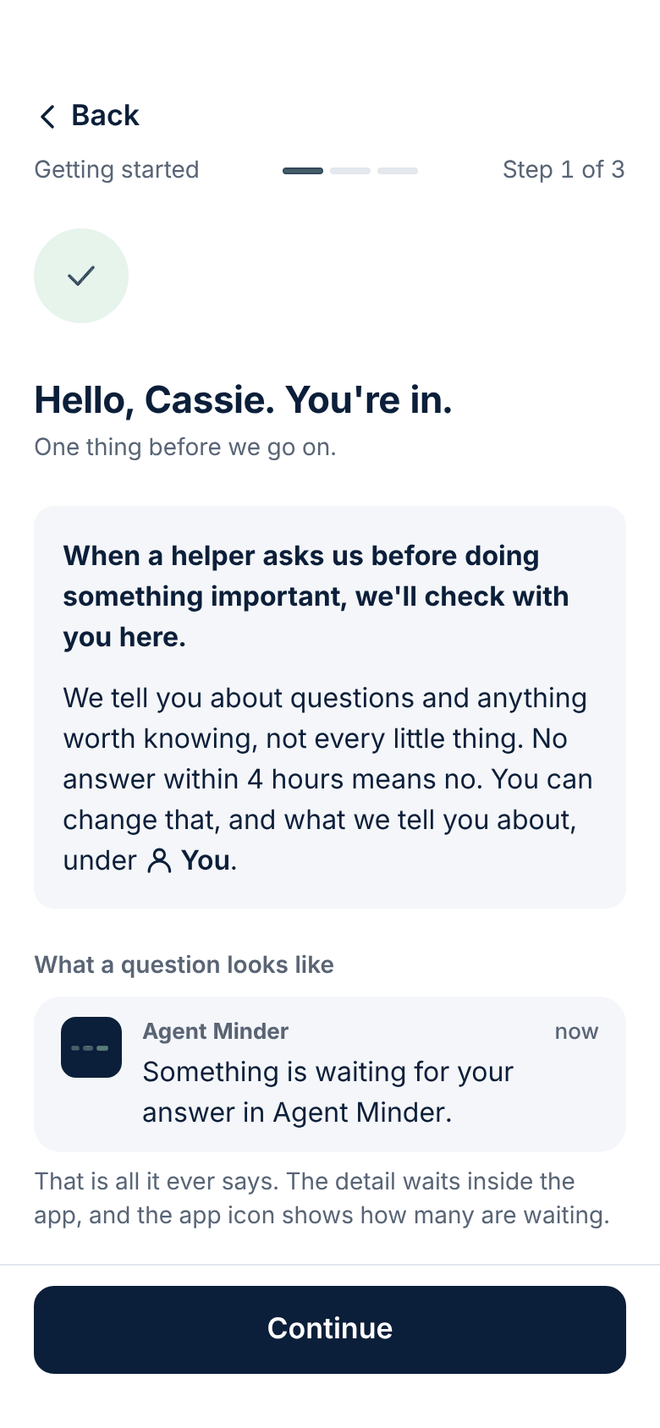
3 of 28 · Getting started
Hello: how a question reaches you
Before anything else, one short screen on what happens when an agent wants to check with you.
A question, then an email
If you miss a question on your phone, we email you too.
An answer if you're busy
No answer in four hours means we say no for you. You can change the four hours.
Only what matters
We tell you about questions and anything worth knowing, not every little thing.
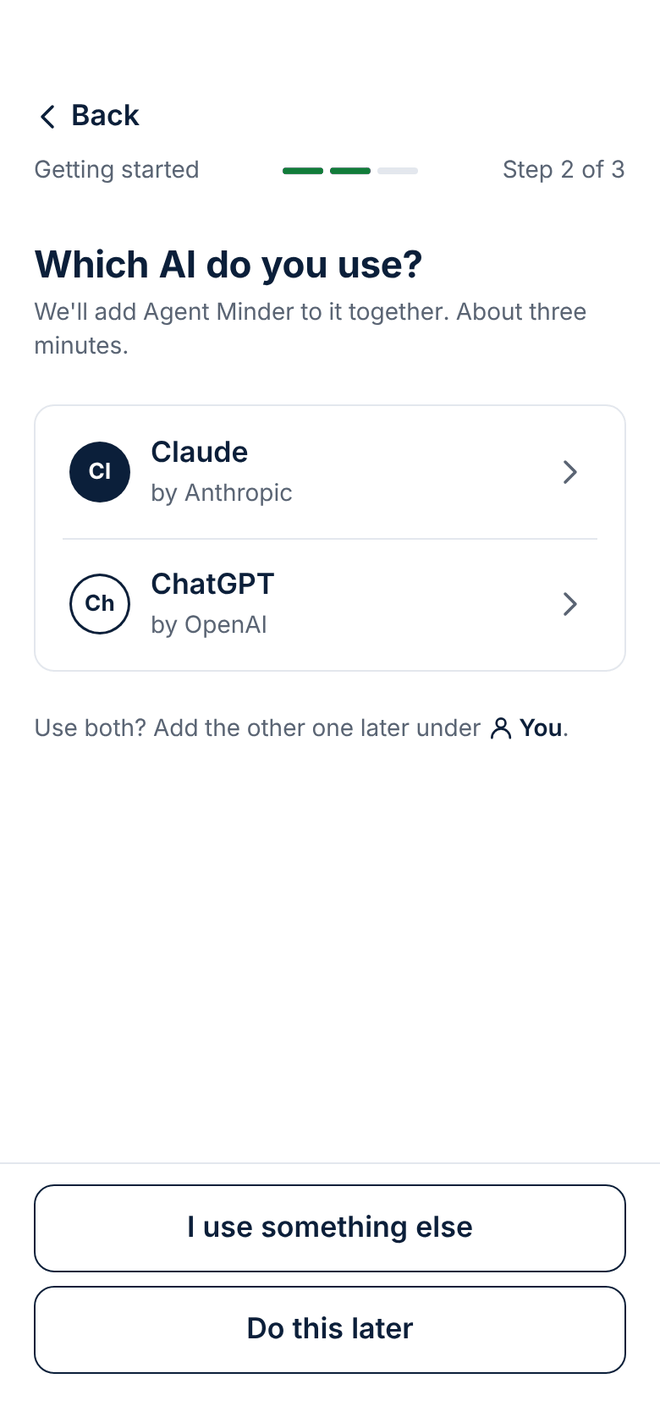
4 of 28 · Connecting your AI
Which AI do you use?
Pick Claude or ChatGPT by name, and Agent Minder walks you through adding it. It takes about three minutes.
By name, not by jargon
Two clear choices, each with the company that makes it.
One at a time
Use both? Add the other one later, under the You tab.
Not ready yet?
"Do this later" lets you look around first.
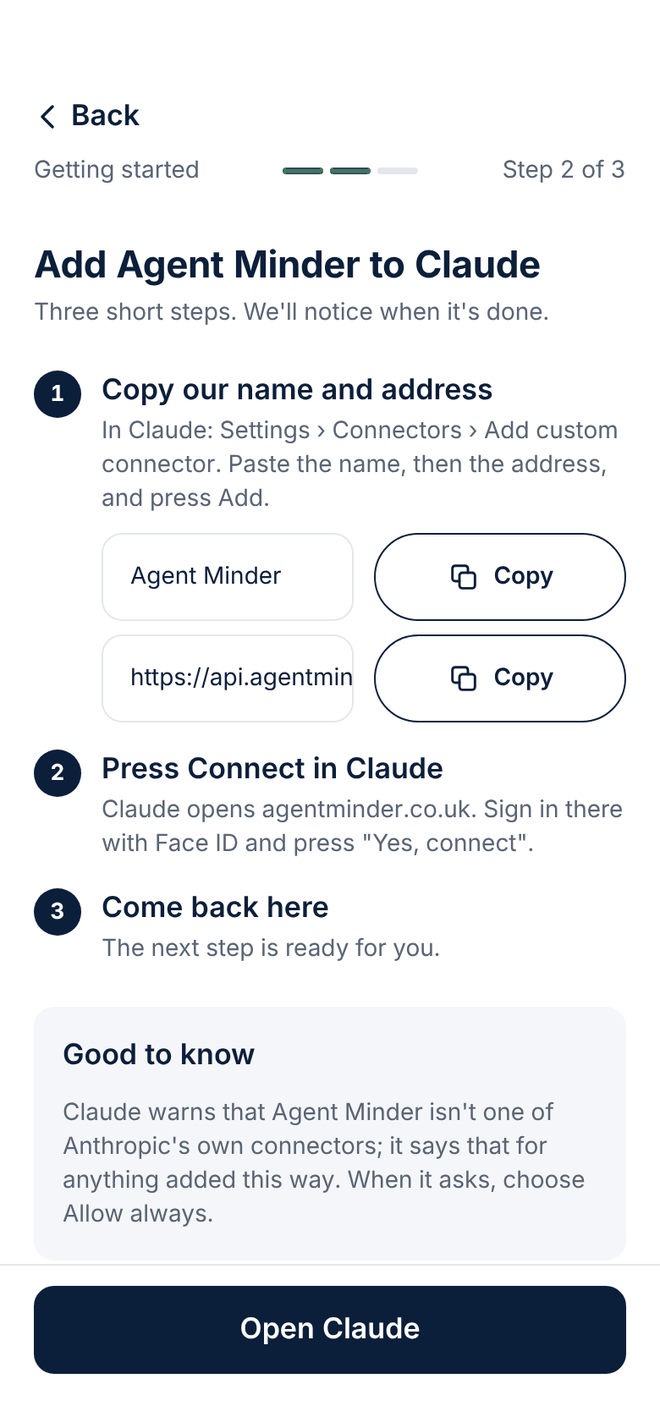
5 of 28 · Connecting your AI
Add Agent Minder to Claude, in three steps
Copy our name and address, press Connect in Claude, and come back. The app notices when each step is done.
Copy buttons for both lines
No typing out a web address by hand.
Where to tap, written down
Each step names the exact place in Claude's settings.
Told what to expect
Claude shows a warning that Agent Minder isn't one of its own connectors, and the screen says so first.
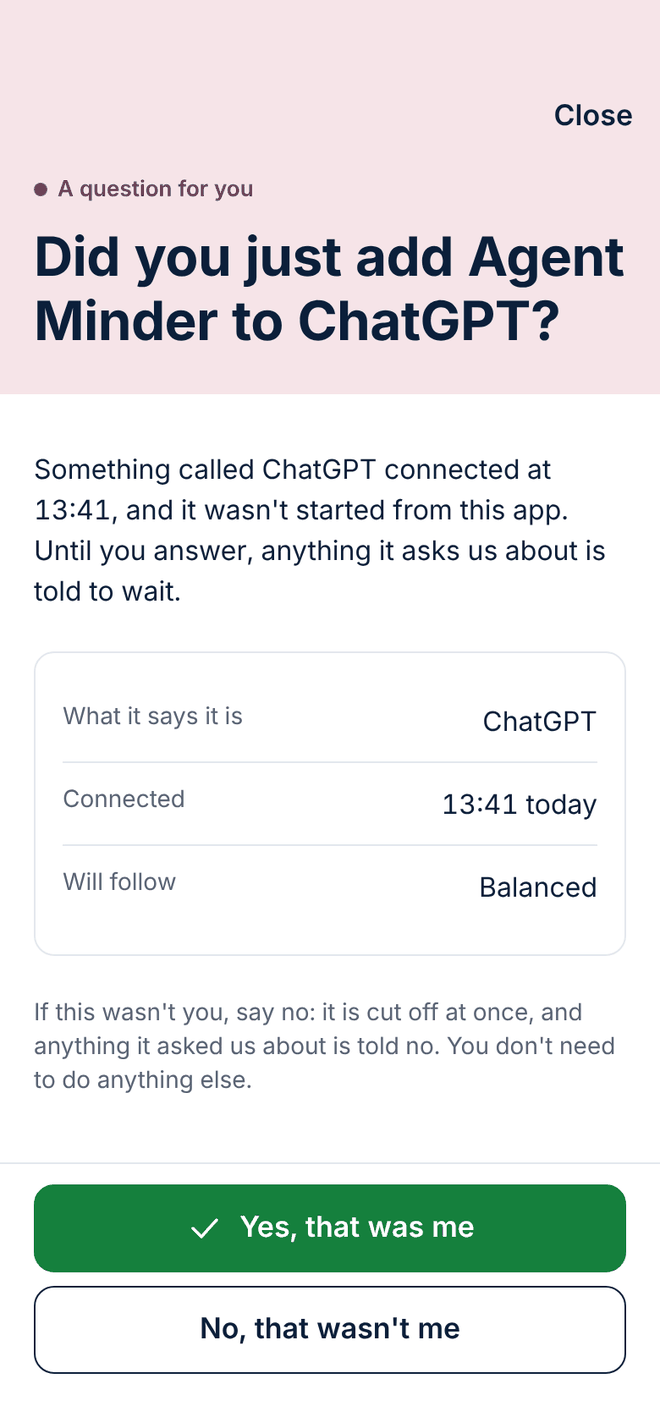
6 of 28 · Connecting your AI
Confirm the connection is yours
A new connection only counts once you say it's yours, so nobody else can quietly link an agent to your account.
What it says it is
The name and account the connection gave, and the time it connected.
Held until you say
Until you confirm, anything it asks us about is told to wait.
One tap to block it
"That wasn't me" blocks the connection straight away.
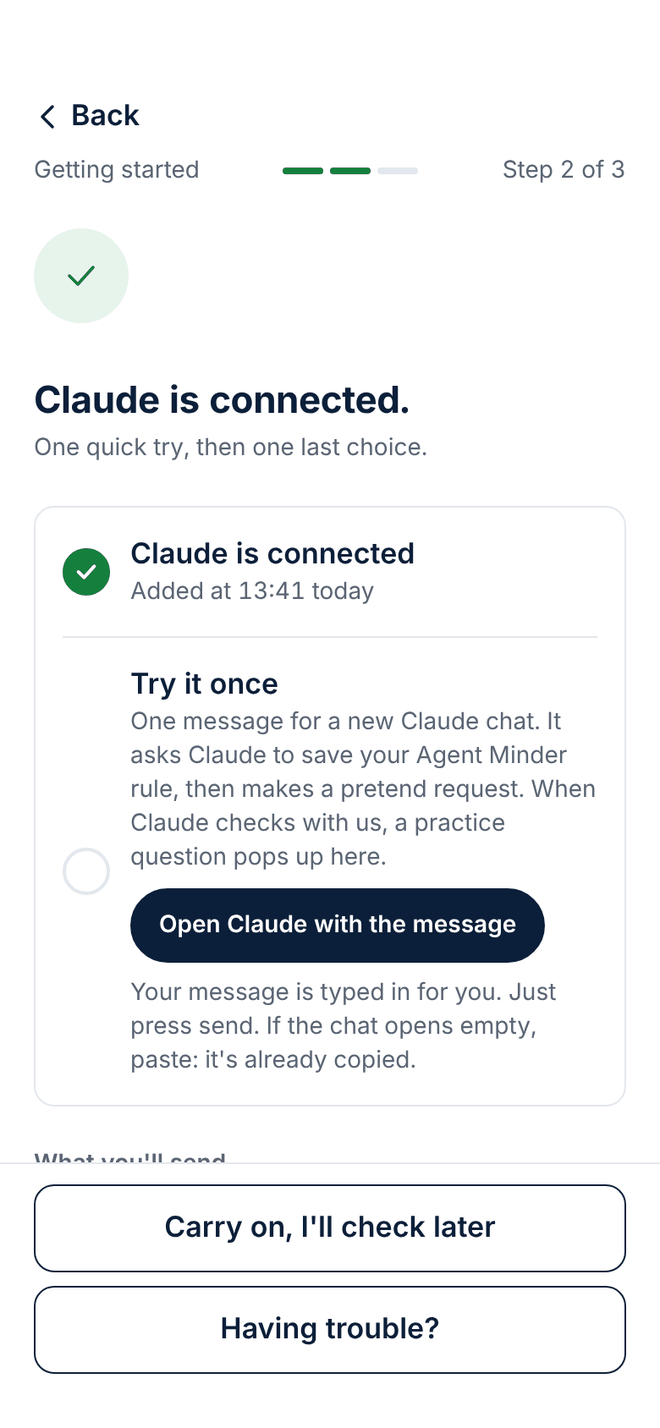
7 of 28 · Connecting your AI
Claude is connected: two quick steps left
A short checklist turns green as you go: the connection, the Agent Minder tag and one practice run.
The Agent Minder tag
One line for Claude's settings that reminds each new chat to check with us first.
A practice run
Paste a pretend request into a new chat and watch the question arrive.
Help if it doesn't work
"Having trouble?" is always one tap away.
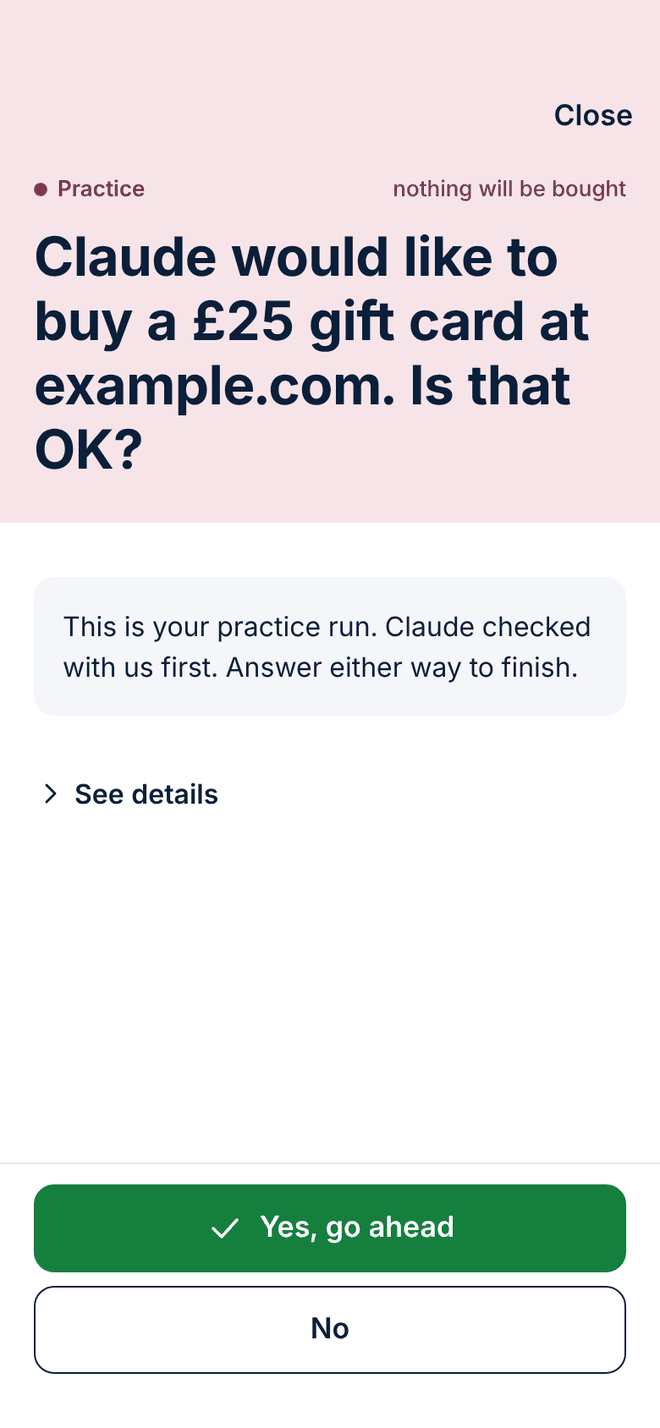
8 of 28 · Connecting your AI
A practice question, with nothing bought
Your first question is a pretend one, so you can see what a real one looks like before it matters.
Clearly marked
"Practice" at the top, and "nothing will be bought" beside it.
Either answer finishes it
Yes or No both complete the practice run.
The same screen as the real thing
So the first real question looks familiar.
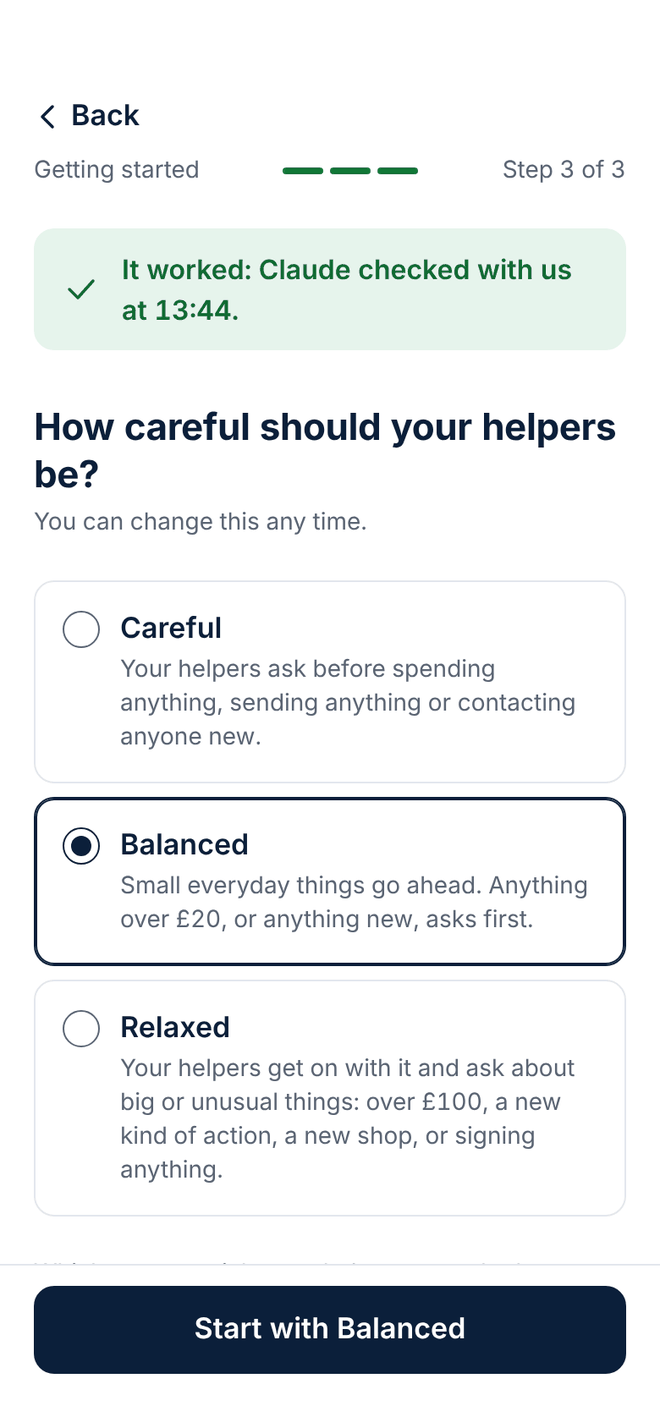
9 of 28 · Your rules
Choose how careful your agents should be
Careful, Balanced or Relaxed sets how often your agents are asked to check with you. Change it any time.
Careful
Your agents are asked to check before spending anything, sending anything or contacting anyone new.
Balanced
Small everyday things go ahead. Anything over a set amount, or anything new, is asked first.
Some things, whatever you pick
Your agents are asked not to share your passwords, codes, health or money details.
10 of 28 · Your rules
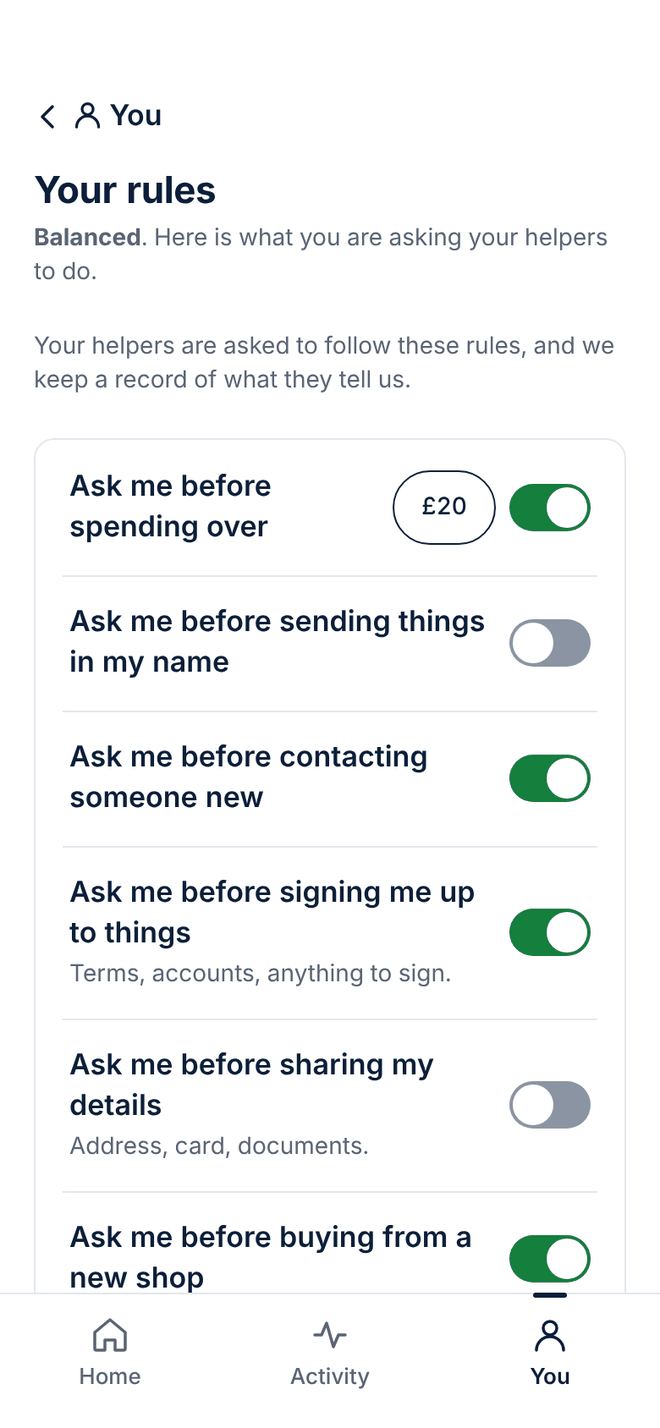
Your rules, one switch each
Every rule your agents are asked to follow, in plain words, with a switch beside each one.
Asked, not forced
The screen says it in so many words: your agents are asked to follow these rules.
A record either way
We keep a record of what your agents tell us.
Amounts you set
Tap an amount to change it.
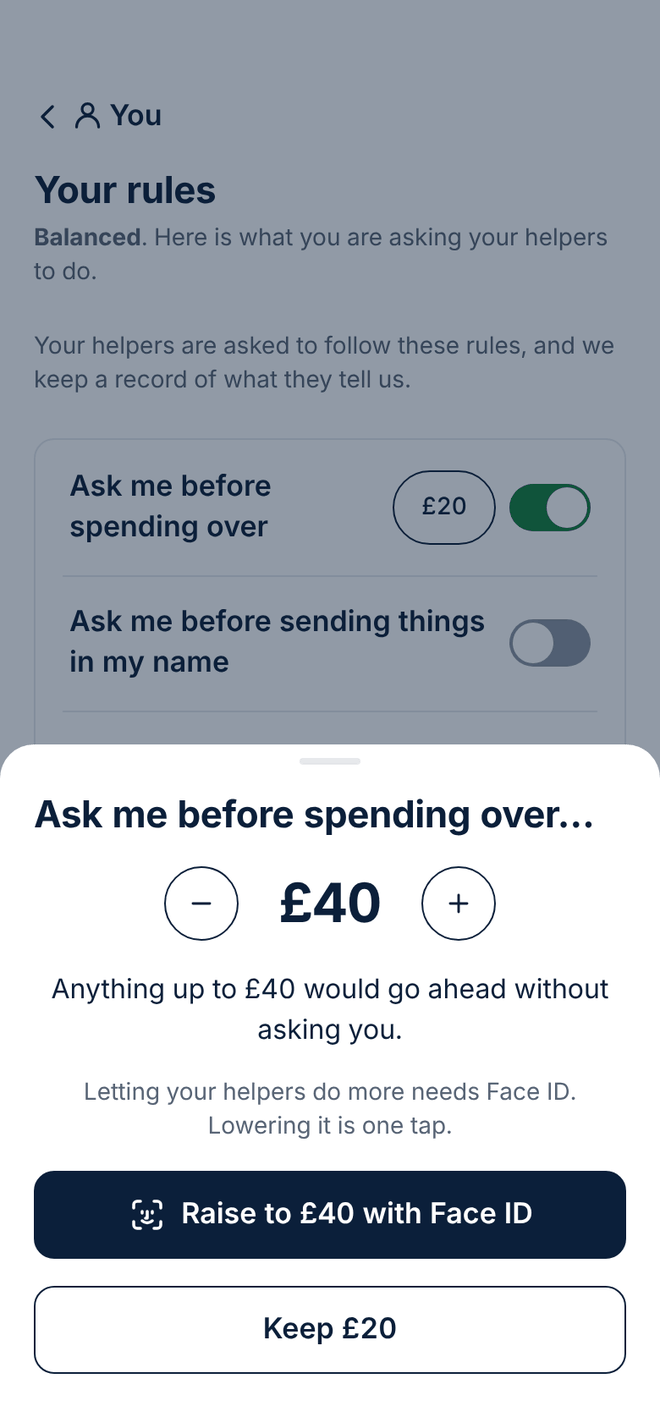
11 of 28 · Your rules
Change the amount
Set the amount above which your agents are asked to check with you first.
One number
Plus and minus buttons, and the new amount in large type.
What it means, in a sentence
The screen spells out what would go ahead without asking you.
Looser needs your passkey (Face ID or fingerprint)
Letting your agents do more needs your passkey. Lowering the amount is one tap.
12 of 28 · Your rules
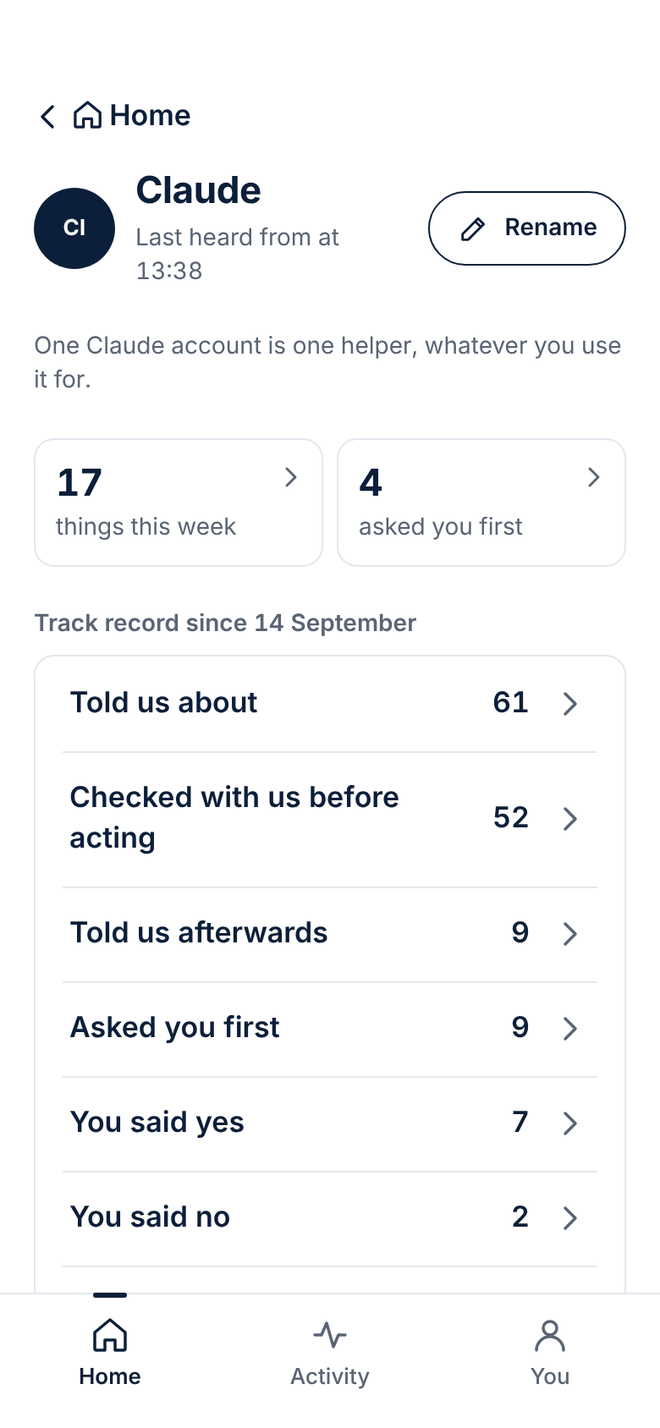
One agent, up close
Everything about one agent on one screen: what it did this week, its rules, and when it was last heard from.
Counts, not ratings
How many things it did this week, and how many times it asked you first.
Its own settings
Its rules, spending it has told us about, and shops to avoid.
Tell me if it goes quiet
Choose when you want to hear that an agent has stopped checking in.
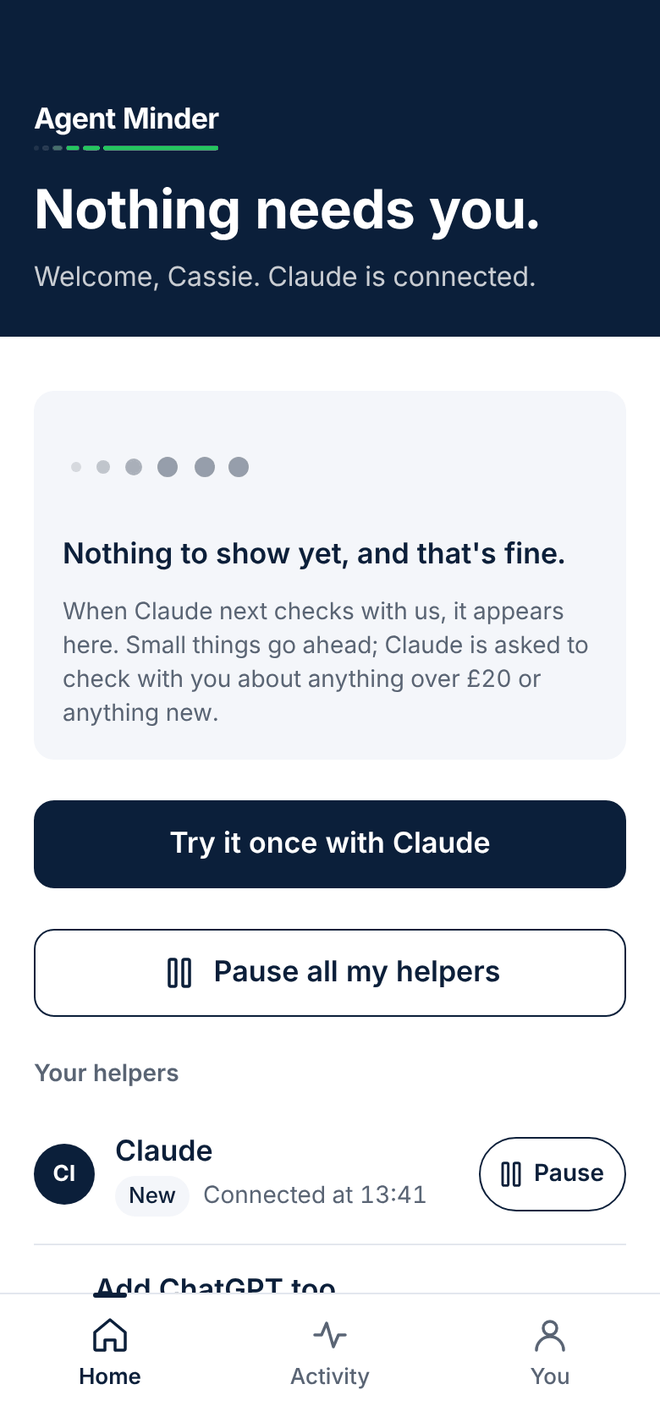
13 of 28 · Every day
Home on your first day
Before your agent has done anything, Home says so, and shows you how to try it once.
Nothing yet, and that's fine
A calm empty state, not a blank screen.
Try it once
One button sends you back to Claude for a practice run.
Pause is there from day one
"Pause all my agents" sits on Home from the very start.
14 of 28 · Every day
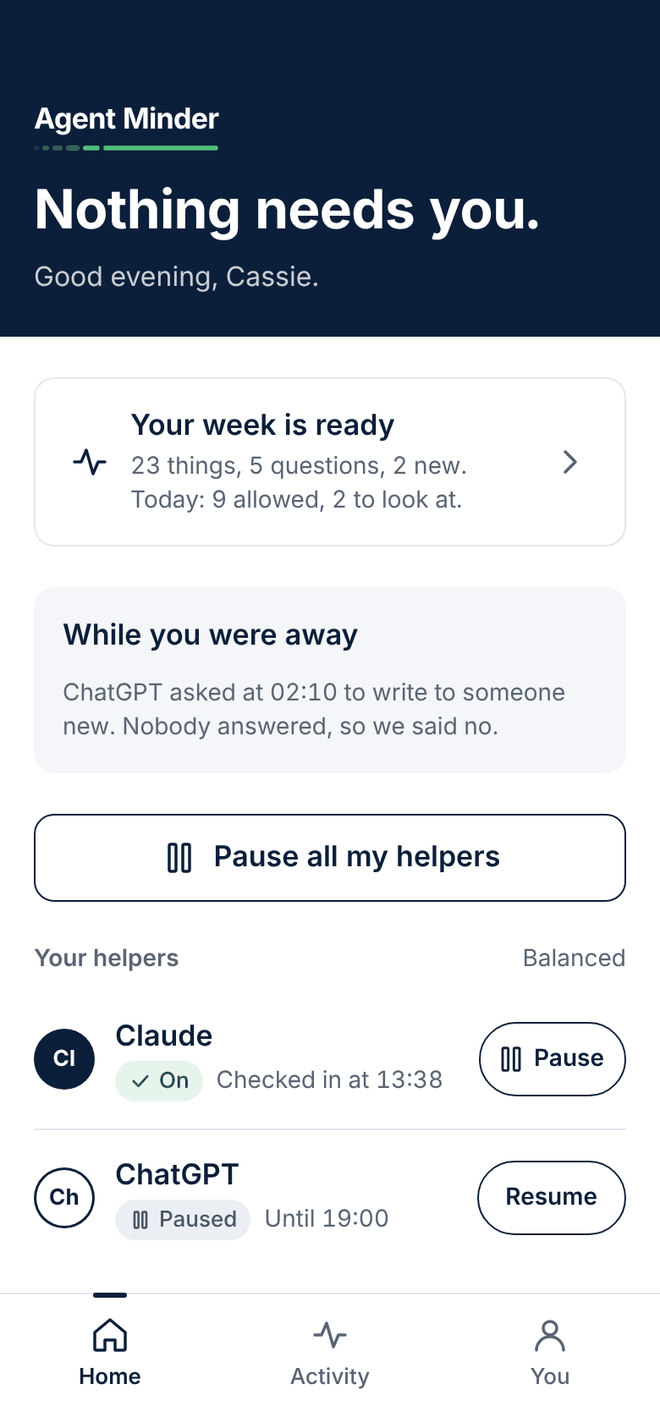
Home: does anything need you?
Open the app and the first line answers the only question that matters. Here, nothing does.
Nothing needs you.
Said plainly, in the largest type on the screen.
While you were away
What happened overnight, such as a question nobody answered, so we said no.
Each agent, with its switch
When it last checked in, whether it's on or paused, and a button to pause or resume it.
15 of 28 · Every day
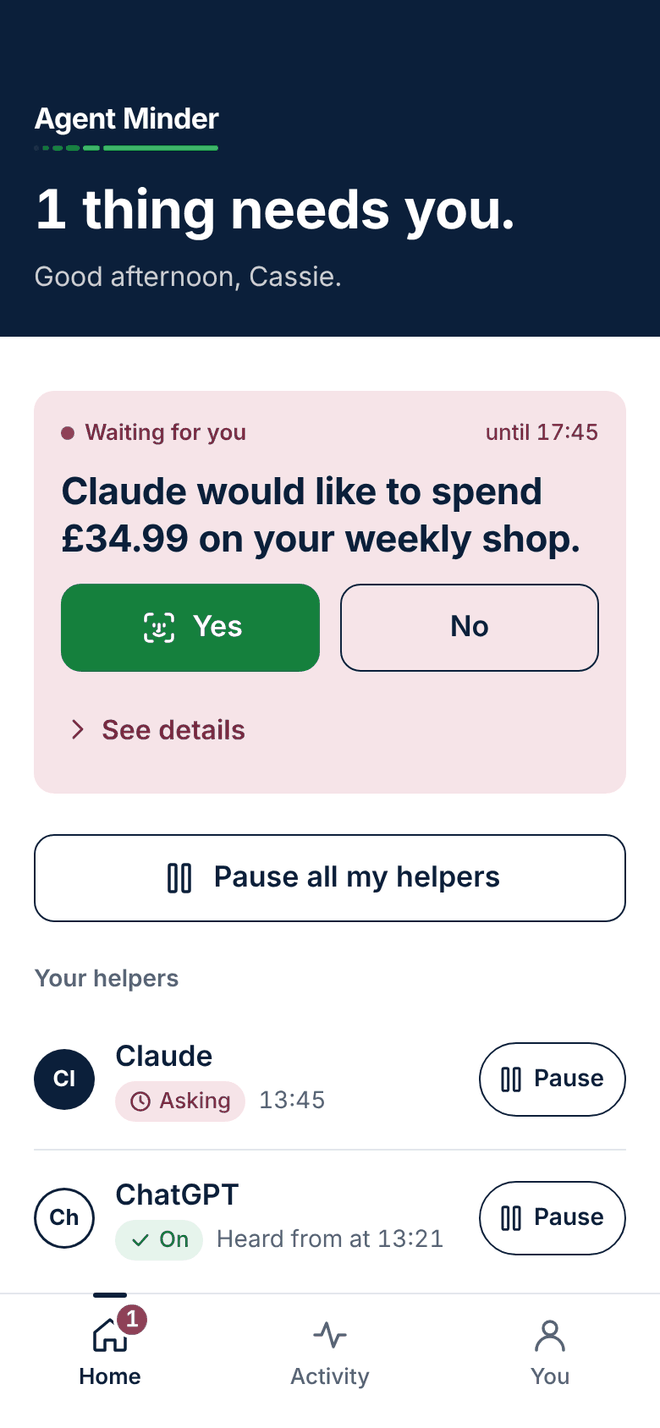
Home, when a question is waiting
A question for you is the only thing on screen in rose, so you can't miss it.
1 thing needs you.
The headline changes the moment something waits.
Answer it right there
Yes and No are on the card, with the details one tap away.
A deadline you can see
The card says when we'll answer no for you if you're busy.
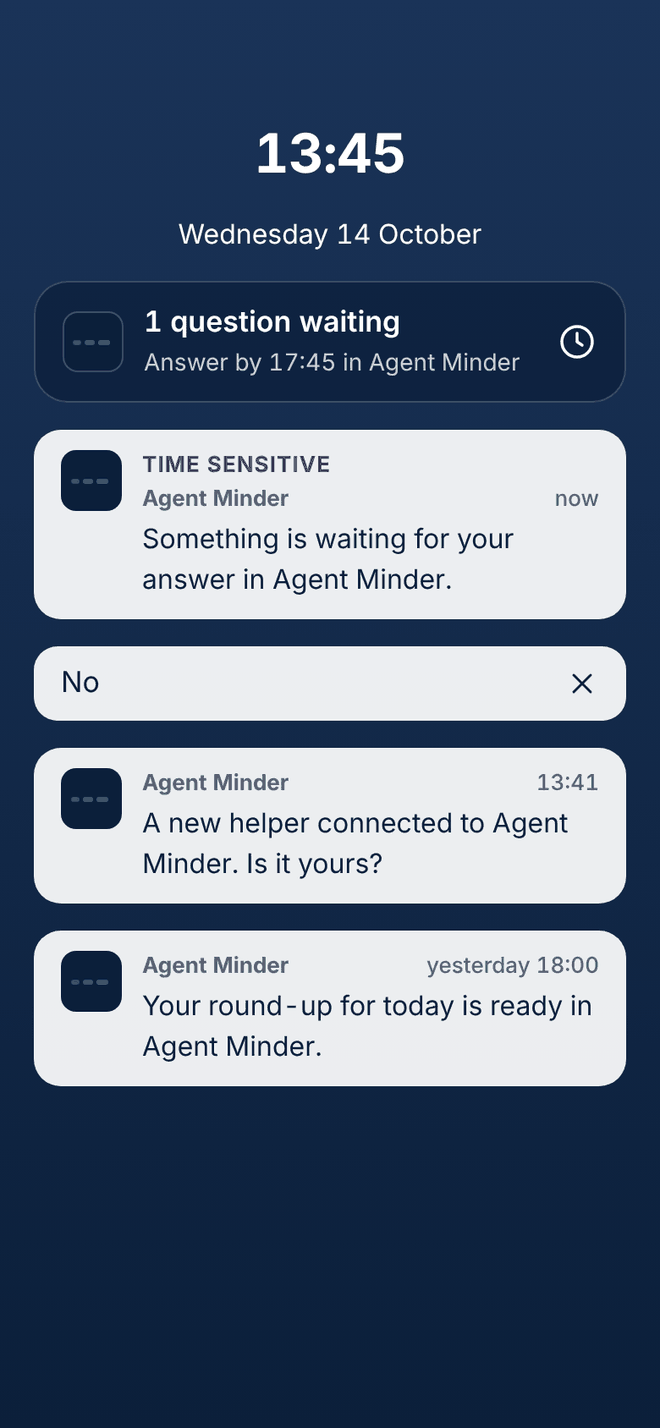
16 of 28 · Every day
On your lock screen
What our notifications look like, so a stranger glancing at your phone learns nothing.
No amounts, no shops
A notification never names a helper, an amount, a shop or a link.
Tap to open the app
The details are only inside the app.
How to spot a fake
A notification with an amount or a link in it is not from us.
17 of 28 · Every day
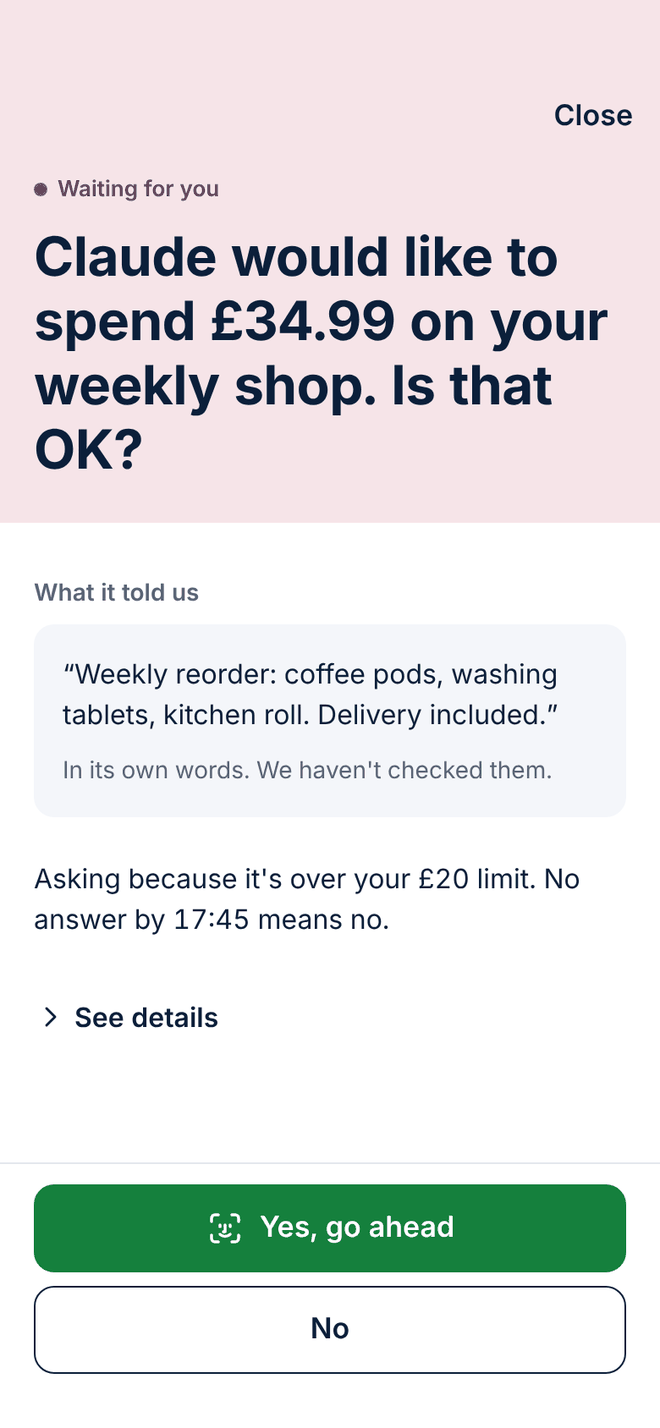
A question for you
When your agent checks with you first, this is the screen. One question, in large type, with Yes and No under your thumb.
What it told us, in its own words
Shown as a quote, with a note that we haven't checked it.
Why it is asking
Because of a rule you chose, named on the screen.
If you say nothing
By the time shown, we say no for you.
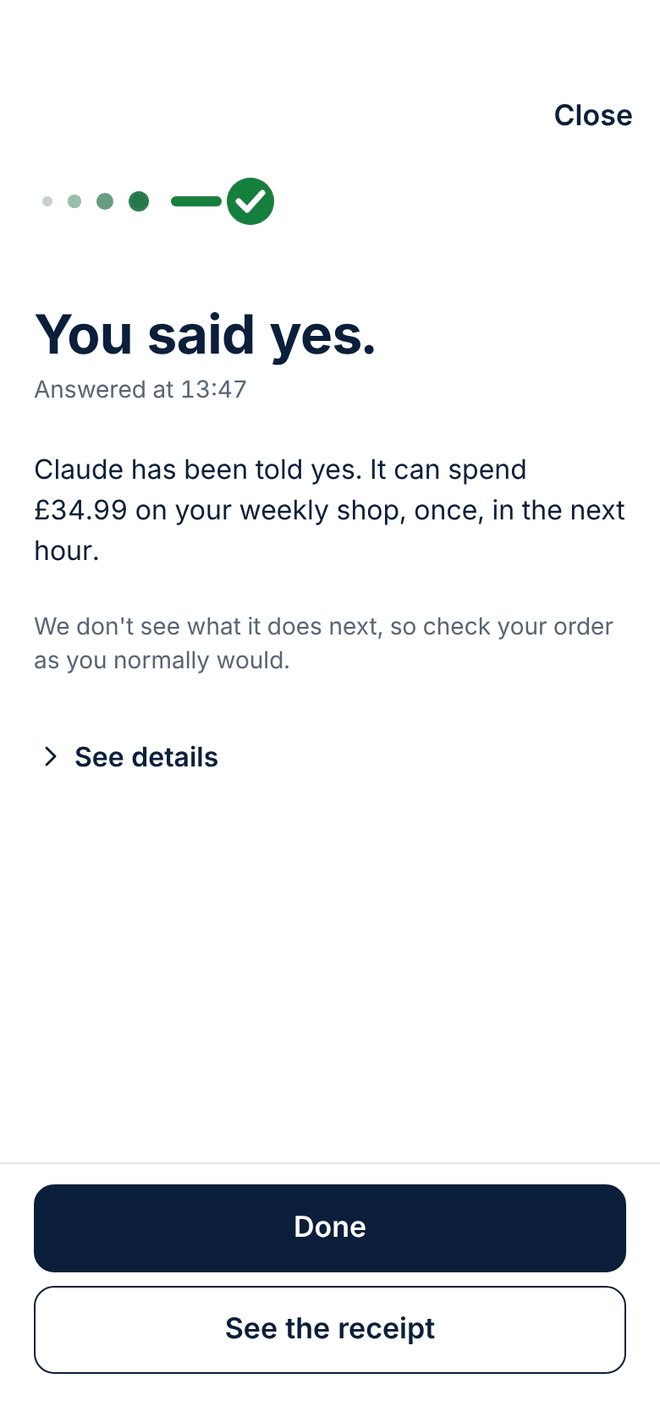
18 of 28 · Every day
You said yes
What your yes allows, and for how long, in one sentence.
Once, and for a short time
Your yes covers that one purchase, once, within the hour (15 minutes for a coding tool), and you can take it back sooner.
Honest about what we see
We don't see what the agent does next, so the screen tells you to check your order as you normally would.
Written down
The answer goes into Your record, with a signed record of what was asked and what you said.
19 of 28 · Every day
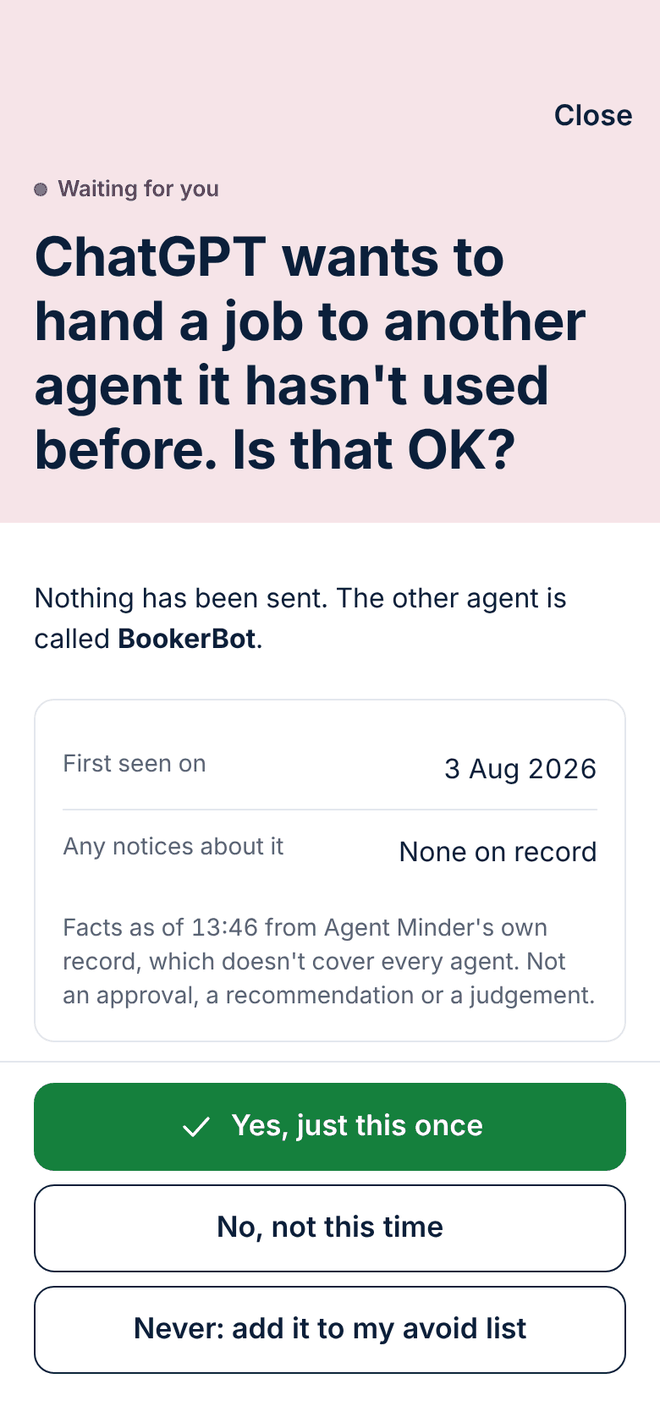
Something new, brought to you first
When an agent wants to do something it hasn't done before, such as handing a job to an agent it hasn't used, it is asked to bring it to you.
Facts about the other agent
Planned for the first version: when it was first seen and whether there are any notices about it. Facts, not a score.
Once, or not this time
Allow it just this once, or say no.
Never again
One button adds it to your avoid list.
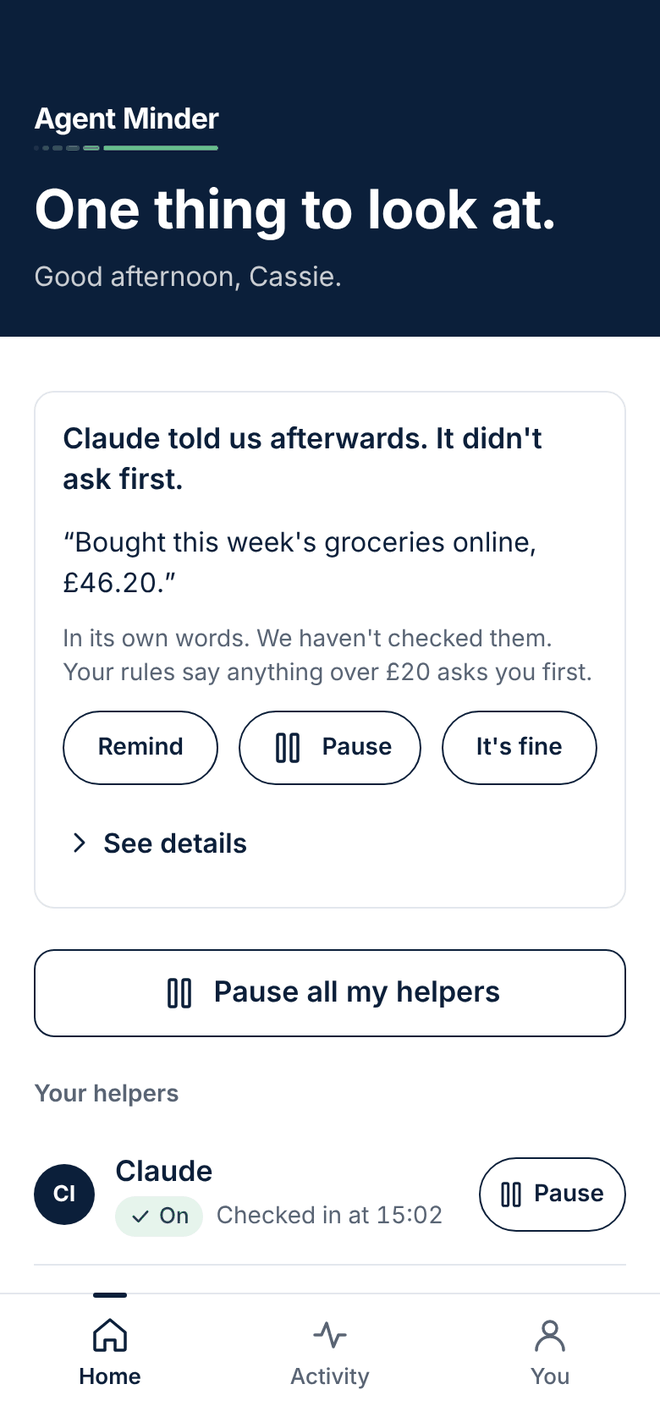
20 of 28 · Every day
When an agent tells you afterwards
If an agent tells us about something it did without asking first, Home shows it, so it doesn't pass unnoticed.
Plainly labelled
"Claude told us afterwards. It didn't ask first."
Next to your rule
The screen shows which of your rules says it should have asked.
Three ways to respond
Remind it, pause it, or say it's fine.
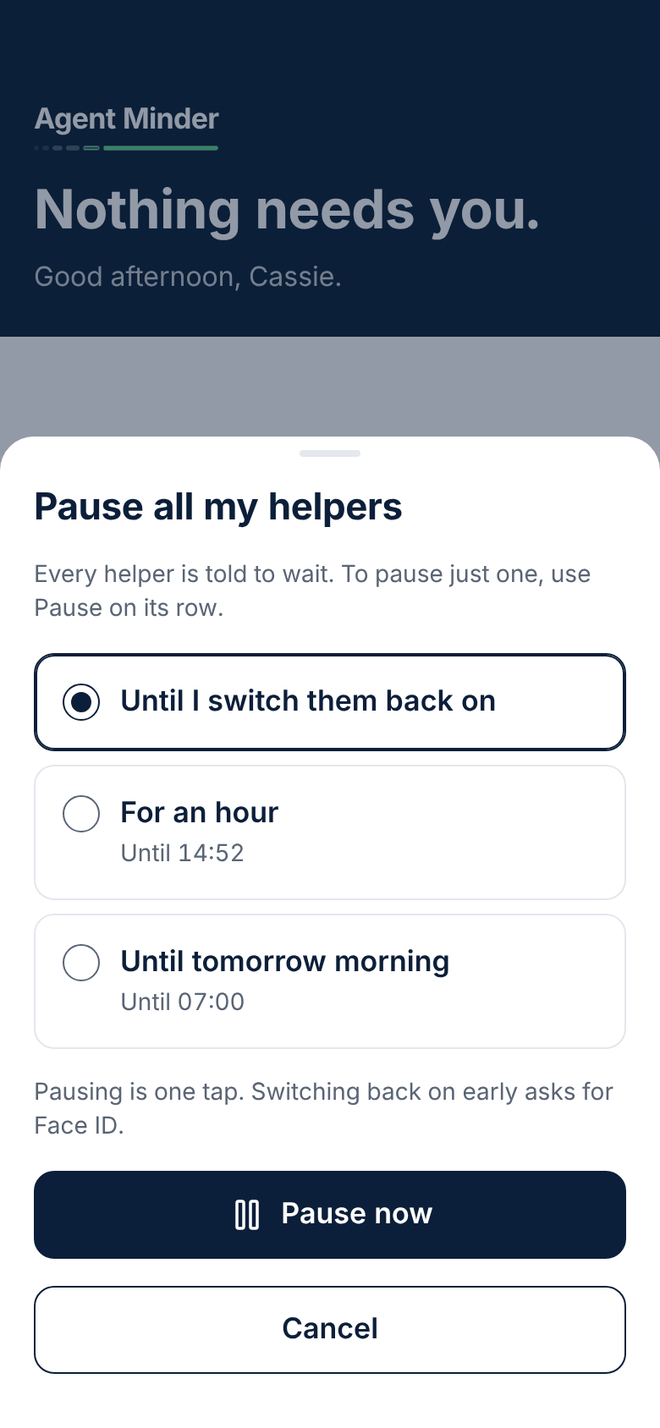
21 of 28 · Every day
Pause all my agents
One button on Home, then one choice: until you switch them back on, for an hour, or until tomorrow morning.
Every agent is told to wait
To pause just one, use the Pause button on its row.
Pausing is one tap
Whatever you choose. Switching back on early needs your passkey (Face ID or fingerprint).
Easy to back out
Cancel is the other button on the screen.
22 of 28 · Every day
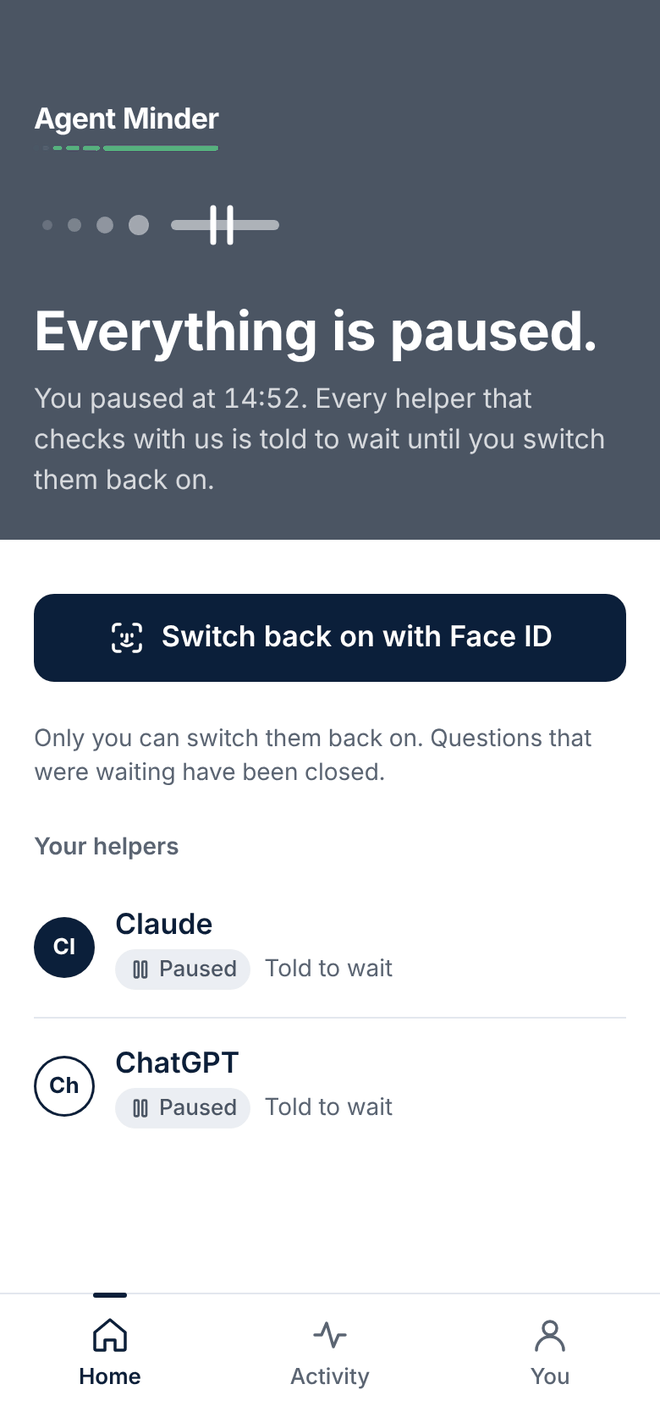
Everything paused
Home turns grey, so it is obvious at a glance that every agent has been told to wait.
When, and how long
"You paused at 14:52. Every agent that asks is told to wait until you say so."
Questions closed
Any questions that were waiting have been closed.
Back on with your passkey (Face ID or fingerprint)
Only you can switch them back on.
23 of 28 · Every day
Activity: today, as it happens
Everything your agents told us about today, newest first, with what each line was about.
Filter by agent
All, Claude or ChatGPT, in one tap.
Labels, not just colours
Waiting for you, You said yes, Told us afterwards: each in words.
Tap for the receipt
Every line opens the record behind it.
24 of 28 · Your record
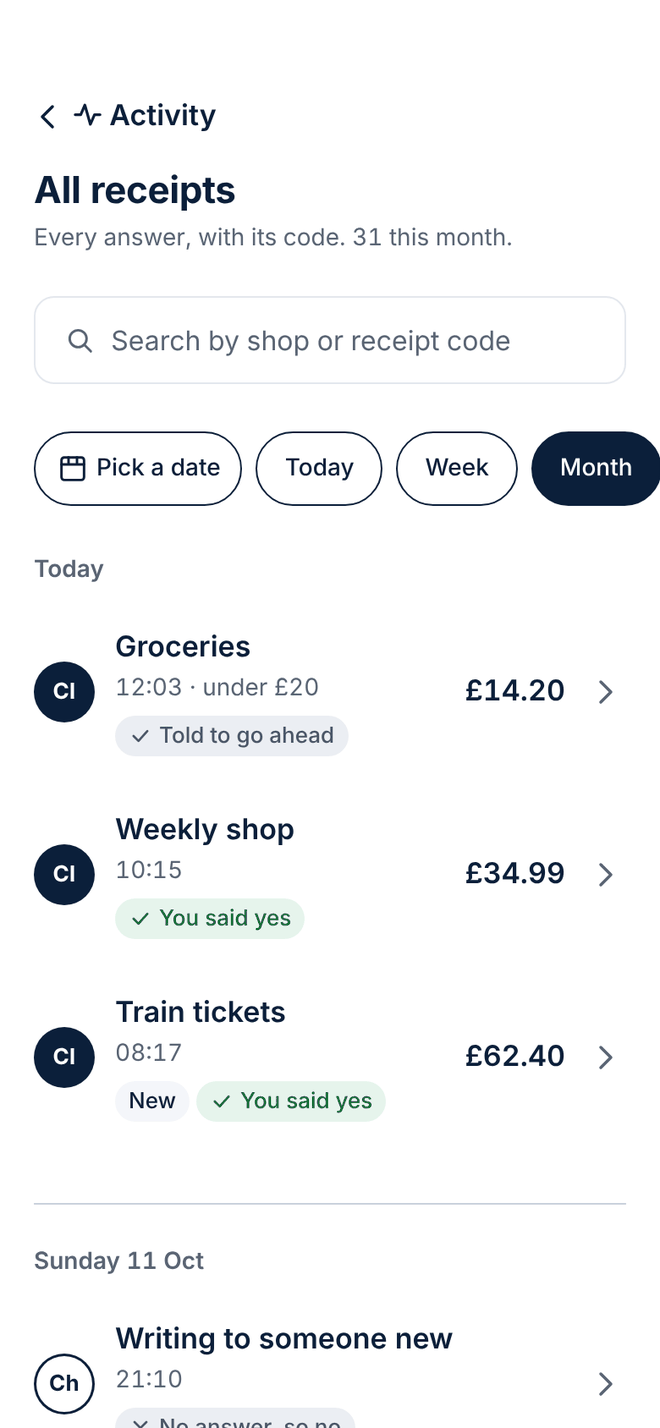
Every receipt, searchable
Every answer, with its receipt code, grouped by day.
Search
By shop or by receipt code.
Pick a date
Or jump to today, this week or this month.
Status in words
Each receipt says what happened, not just a colour.
25 of 28 · Your record
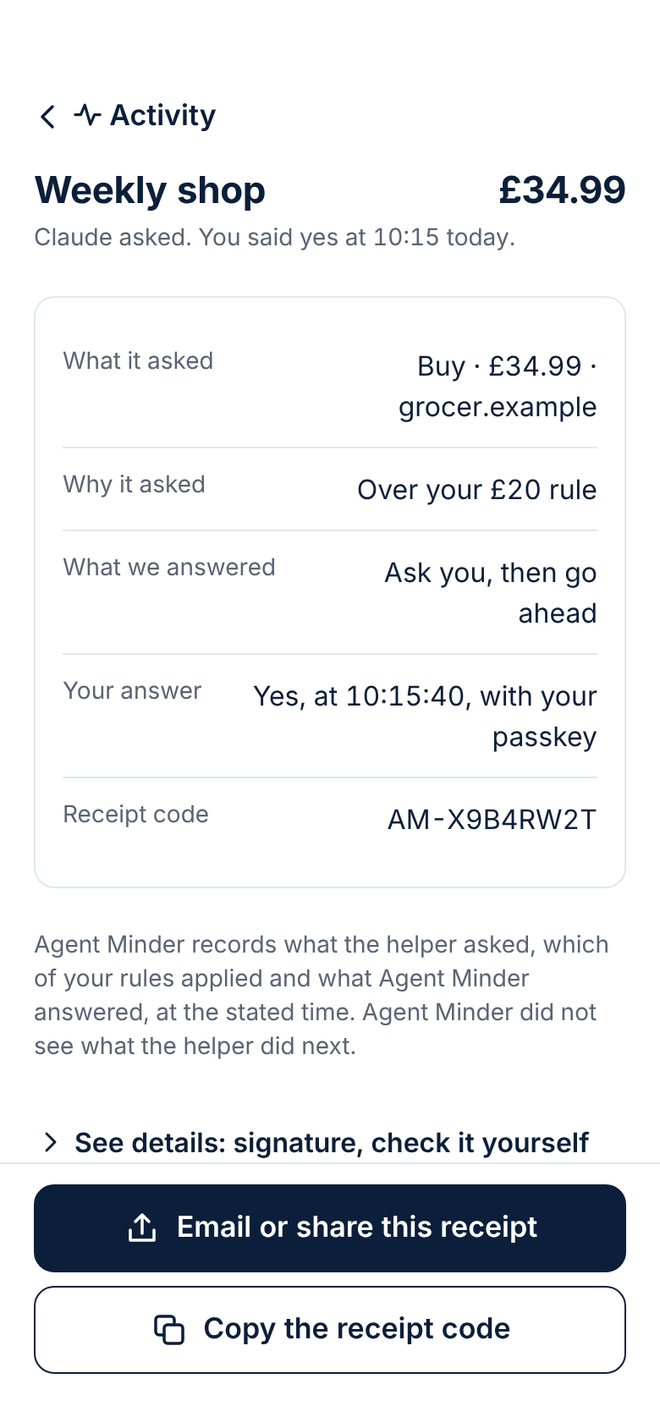
One receipt
Exactly what the agent asked, why, what Agent Minder answered and what you said, with the time to the second.
A receipt code
A short code you can quote, starting AM-.
Honest about its limits
It records what was asked and answered. It says we didn't see what the agent did next.
Yours to keep
Copy the receipt code, so you can quote it whenever you need it.
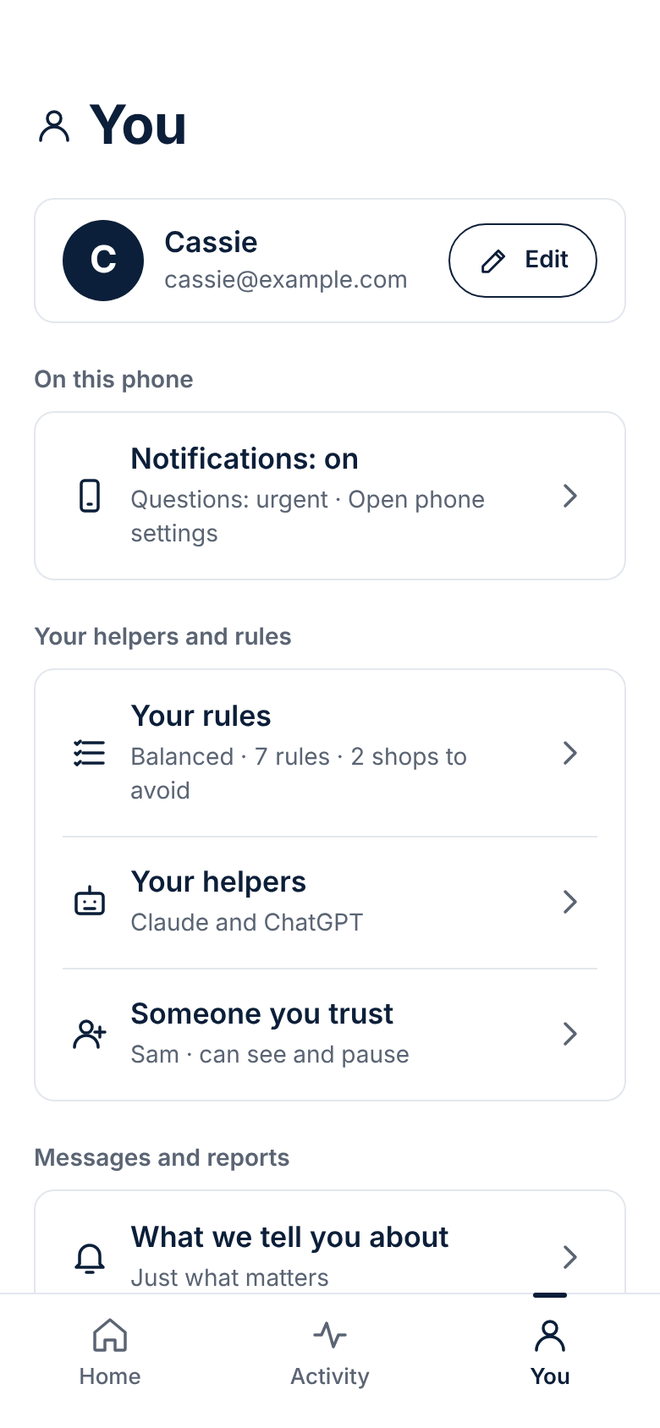
26 of 28 · You
You: your account in one place
Your rules, your agents, and how and when we tell you things, all from one tab.
Your agents and rules
How careful you chose, and every connected agent.
Notifications your way
What we tell you about, quiet hours, and what happens if you don't answer.
Everything else
Someone you trust, your devices, your data, and help.
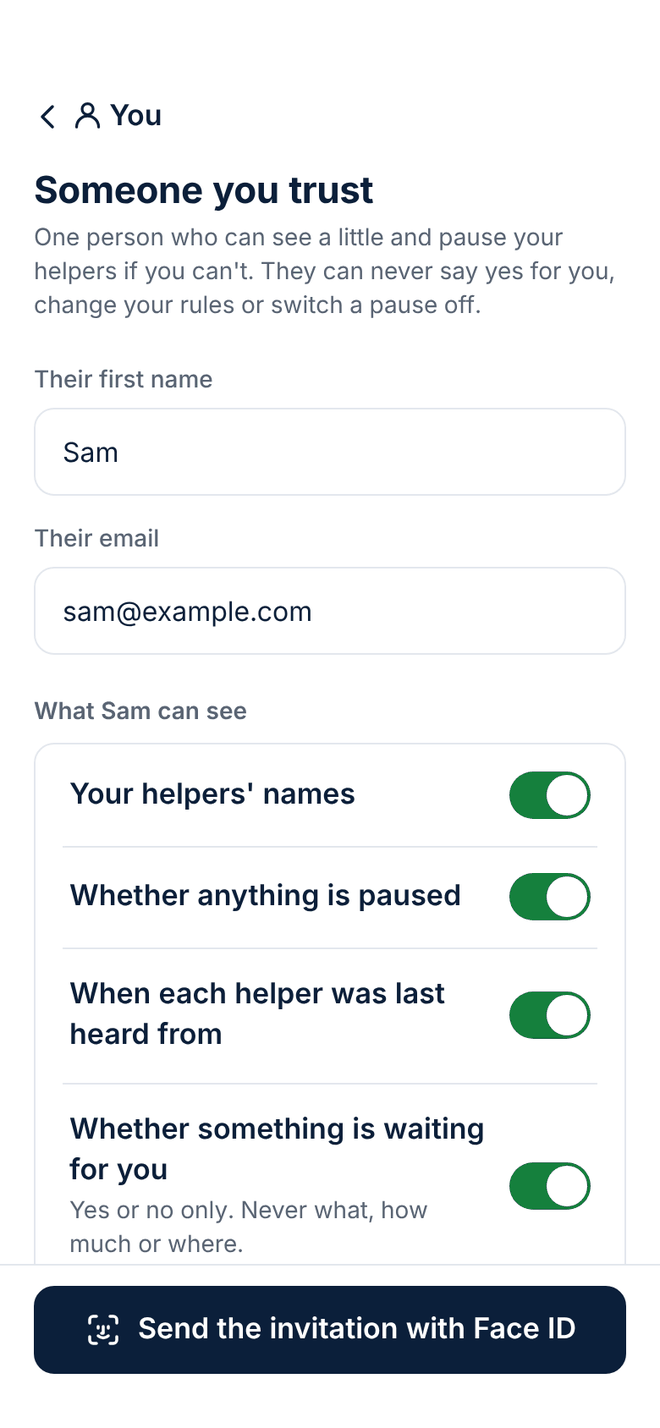
27 of 28 · You
Someone you trust
Choose one person who can see a little and pause your agents if you can't.
They can never say yes for you
Or change your rules, or switch a pause off.
You choose what they see
Your agents' names, whether anything is paused, and when each was last heard from.
Invited by you
Their invitation is sent only after you confirm with your passkey (Face ID or fingerprint).
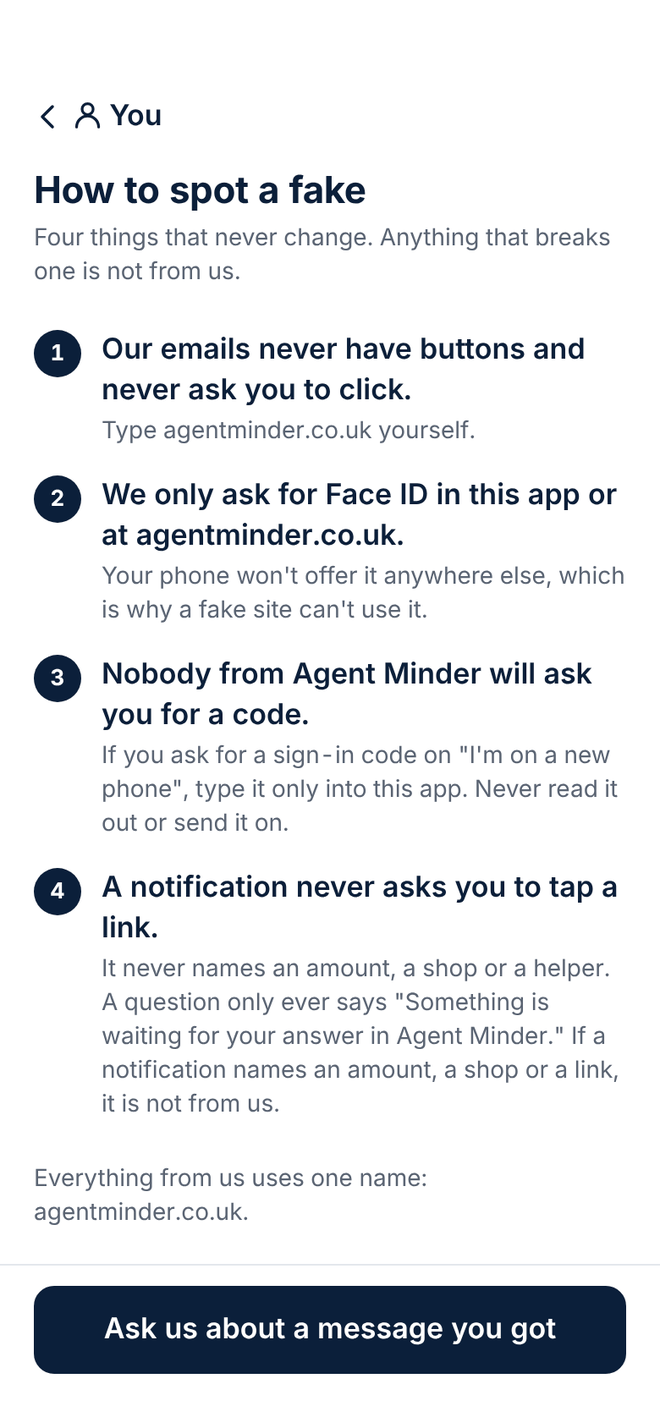
28 of 28 · You
How to spot a fake
Four things that never change. Anything that breaks one is not from us.
No buttons in our emails
And they never ask you to click.
Your passkey (Face ID or fingerprint) only here
In this app or at agentminder.co.uk. Your phone won't offer it anywhere else.
We never ask for your backup code
Nobody from Agent Minder will ask for it by email or phone.
Founding members
Join now. Get Plus free for 3 months, or a year with three people.
Everyone who joins the waiting list and confirms their email before launch is a founding member.
Plus free for your first 3 months
Everything in Plus, free for 3 months from the day you subscribe in the app: connect every agent you use, and keep every receipt for years, so you can show what happened long after.
Three people join with your link, and it’s a year
If three people join with your link and each keeps an agent connected for 14 days in a row, all inside your 3 free months, your free Plus runs to 12 months in all. The app shows how many have counted.
First in
Invited before the public, starting with the testing group.
A say in what we build
If you tick ‘help test it’, short questions now and then, and your ideas read by the people building it.
Founding members confirm their email before Agent Minder's public launch; we announce the date here at least 14 days before. For people aged 18 or over, one per person; the offer applies to accounts opened in the UK. To claim, open your account with the same email address within 30 days of launch and subscribe to Plus in the app through Apple or Google, who hold your payment method. Nothing is charged during your free months. Before you subscribe, the app shows the price of Plus after your free time (not yet set; the app shows it before you subscribe) and the date of the first charge; it then renews automatically unless you cancel, at any time, in your Apple or Google subscriptions. We remind you before any charge. All three people must count before your 3 free months end; if they count later, nothing changes and nothing is refunded under this offer. Each person you count must join with your link; it is for you to decide whether to tell anyone, and how. Your app simply says “Founding member”. The promoter’s name and postal address are in the founding member terms.
Join the waiting list
An email address is all we need.
Confirming your email before launch makes you a founding member under the founding member terms.
No cookies. No advertising trackers. We use your email only for this. Read the privacy notice.